Get a text when someone submits your WordPress form.
If Contact Form 7 already emails you new inquiries, one Bcc line can send the subject to your phone. Your inbox keeps the original email.
20 alerts over 14 days. No card required. Then $9/month if you subscribe.
Get your private SelfPing address
Open the trial, verify the US or Canadian mobile number that should get the alerts, and choose “Create my email address.” Copy the address. Setting this up for a client? Have them complete this step with their own phone.
Add one line in the Mail tab
In WordPress, open Contact → Contact Forms, choose your form, and open Mail. Under Additional headers, add
Bcc:followed by a space and your private address on its own line. Keep the existing To address and Reply-To header. Save the form. Bcc sends SelfPing a copy of the email, including its body. By default, only the subject appears in the text.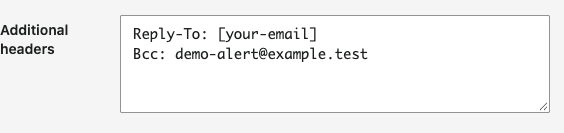
Use the address from your dashboard in place of demo-alert@example.test. Submit a test inquiry
An email with the subject “New quote request: Water heater” produces the text “SelfPing: New quote request: Water heater” with the default settings. Use a short subject you can act on. Check your inbox and Recent alerts in SelfPing. A test text uses one alert.
If the original email never arrives, check your WordPress mail setup first. If it arrives without a text, check the Bcc address and the delivery status. SelfPing skips identical alerts received within five minutes.